
たまに必要になるQRコード。古来からGoogle spreadsheetを使ってきたのだけど、なかなかめんどくさいので、ローカル生成することにした。
libqrencodeに付属しているqrencodeを使うことにする。開発者は日本人なんだな。
libqrencode | Kentaro Fukuchi's site
https://fukuchi.org/works/qrencode/
GitHub - fukuchi/libqrencode: A fast and compact QR Code encoding library
https://github.com/fukuchi/libqrencode
libpngとSDL2.0に依存している。
でも、macOSへのインストールはhomebrewからできるので、楽ちん。
% brew install qrencode
% qrencode --version
qrencode version 4.1.1
Copyright (C) 2006-2017 Kentaro Fukuchi
使い方。
% qrencode --help
qrencode version 4.1.1
Copyright (C) 2006-2017 Kentaro Fukuchi
Usage: qrencode [-o FILENAME] [OPTION]... [STRING]
Encode input data in a QR Code and save as a PNG or EPS image.
-h, --help display the help message. -h displays only the help of short
options.
-o FILENAME, --output=FILENAME
write image to FILENAME. If '-' is specified, the result
will be output to standard output. If -S is given, structured
symbols are written to FILENAME-01.png, FILENAME-02.png, ...
(suffix is removed from FILENAME, if specified)
-r FILENAME, --read-from=FILENAME
read input data from FILENAME.
-s NUMBER, --size=NUMBER
specify module size in dots (pixels). (default=3)
-l {LMQH}, --level={LMQH}
specify error correction level from L (lowest) to H (highest).
(default=L)
-v NUMBER, --symversion=NUMBER
specify the minimum version of the symbol. See SYMBOL VERSIONS
for more information. (default=auto)
-m NUMBER, --margin=NUMBER
specify the width of the margins. (default=4 (2 for Micro QR)))
-d NUMBER, --dpi=NUMBER
specify the DPI of the generated PNG. (default=72)
-t {PNG,PNG32,EPS,SVG,XPM,ANSI,ANSI256,ASCII,ASCIIi,UTF8,UTF8i,ANSIUTF8,ANSIUTF8i,ANSI256UTF8},
--type={PNG,PNG32,EPS,SVG,XPM,ANSI,ANSI256,ASCII,ASCIIi,UTF8,UTF8i,ANSIUTF8,ANSIUTF8i,ANSI256UTF8}
specify the type of the generated image. (default=PNG)
-S, --structured
make structured symbols. Version must be specified with '-v'.
-k, --kanji assume that the input text contains kanji (shift-jis).
-c, --casesensitive
encode lower-case alphabet characters in 8-bit mode. (default)
-i, --ignorecase
ignore case distinctions and use only upper-case characters.
-8, --8bit encode entire data in 8-bit mode. -k, -c and -i will be ignored.
-M, --micro encode in a Micro QR Code.
--rle enable run-length encoding for SVG.
--svg-path
use single path to draw modules for SVG.
--inline only useful for SVG output, generates an SVG without the XML tag.
--foreground=RRGGBB[AA]
--background=RRGGBB[AA]
specify foreground/background color in hexadecimal notation.
6-digit (RGB) or 8-digit (RGBA) form are supported.
Color output support available only in PNG, EPS and SVG.
--strict-version
disable automatic version number adjustment. If the input data is
too large for the specified version, the program exits with the
code of 1.
-V, --version
display the version number and copyrights of the qrencode.
--verbose
display verbose information to stderr.
[STRING] input data. If it is not specified, data will be taken from
standard input.
SYMBOL VERSIONS
The symbol versions of QR Code range from Version 1 to Version
- Each version has a different module configuration or number
of modules, ranging from Version 1 (21 x 21 modules) up to
Version 40 (177 x 177 modules). Each higher version number
comprises 4 additional modules per side by default. See
http://www.qrcode.com/en/about/version.html for a detailed
version list.
基本的には、入力文字列をQRコードにして画像として出すツール。
% qrencode -o x_kinneko.png "https://x.com/kinneko"
特に応答出力はない。画像はカレントディレクトリに生成されている。

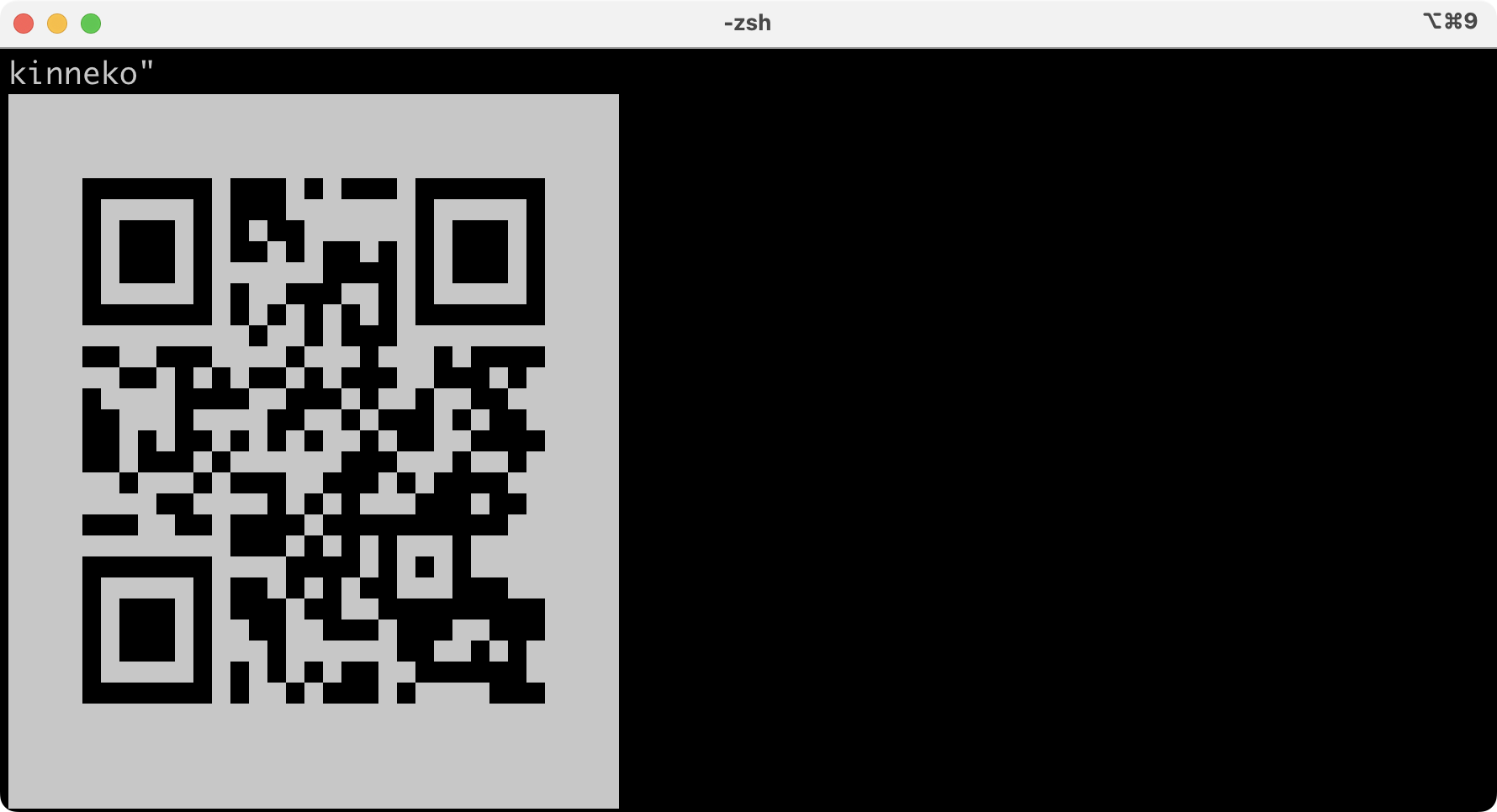
端末にそのままテキスト表示することもできる。テキストなのでコピペもできるけど、行間が0じゃないとダメだね。
% qrencode -t UTF8 "https://x.com/kinneko"
普通に使いそうなオプションはこんな感じ。他にもあるけど略。
-s: 1セルの大きさ(px単位)を変える
qrencode -s 8 -o big.png 'Hello'
-m: 余白サイズを変える
qrencode -m 2 -o margin2.png 'Hello'
-d: DPI を指定する
qrencode -d 300 -o print.png 'Hello'
-l: 誤り訂正を強くする(L<M<Q<H)
qrencode -l H -o robust.png 'Hello'
-v: QRコードの最小バージョンを指定
qrencode -v 5 -o v5.png 'Hello'
--strict-version: バージョン強制
qrencode -v 5 --strict-version -o strict.png 'Hello'
-t: 出力形式を変える(PNG,PNG32,EPS,SVG,XPM,ANSI,ANSI256,ASCII,ASCIIi,UTF8,UTF8i,ANSIUTF8,ANSIUTF8i,ANSI256UTF8})
qrencode -t SVG -o out.svg 'Hello'
前景色と背景色を変える
qrencode -o color.png --foreground=000000 --background=FFFFFF 'Hello'
透過もできる
qrencode -o alpha.png --foreground=000000FF --background=FFFFFFFF 'Hello'
Wi-Fi設定QRを作る
qrencode -8 -o wifi.png 'WIFI:S:MySSID;T:WPA;P:mypassword;;'
qrencode -8 -o wifi_hidden.png 'WIFI:S:MySSID;T:WPA;P:mypassword;H:true;;'
オリジナル投稿:
QRコードの作成をコマンドラインで|kinneko|pixivFANBOX
https://kinneko.fanbox.cc/posts/11582375