

あとは、今月書いたブログを1つ移行してみる。
とりあえず、引数でURLを渡すとキャプチャするシェルスクリプトをAIに書いてもらう。
% vi fetch_fanbox.sh
#!/bin/zsh
set -euo pipefail

if [ $# -lt 1 ]; then
  echo "使い方: $0 URL" >&2
  exit 1
fi

URL="$1"
BASE_DIR="blog_temp"

mkdir -p "$BASE_DIR"

# URL末尾から簡単なスラッグを作る(例: .../10806321 → 10806321)
LAST_PART="${URL%%\?*}"
LAST_PART="${LAST_PART%/}"
LAST_PART="${LAST_PART##*/}"
SLUG=$(echo "$LAST_PART" | tr -cd '[:alnum:]_-')
[ -z "$SLUG" ] && SLUG="page"

POST_DIR="${BASE_DIR}/${SLUG}"
HTML_FILE="${POST_DIR}/page.html"
IMG_DIR="${POST_DIR}/images"

mkdir -p "$POST_DIR" "$IMG_DIR"

echo "Fetching HTML from $URL"
curl -sSL "$URL" -o "$HTML_FILE"

# ベースURL(スキーム+ホスト)
SCHEME_HOST=$(printf '%s\n' "$URL" | sed -E 's|(https?://[^/]+).*|\1|')
# ディレクトリ部分(相対パス用)
BASE_PATH="${URL%%\?*}"
BASE_PATH="${BASE_PATH%/*}"

echo "Extracting image URLs..."

TMP_IMG_LIST=$(mktemp)
# <img ... src="..."> から src だけ抜き出し、重複排除
grep -oiE '<img[^>]+src="[^"]+"' "$HTML_FILE" \
  | sed -E 's/.*src="([^"]+)".*/\1/' \
  | sort -u > "$TMP_IMG_LIST"

if ! [ -s "$TMP_IMG_LIST" ]; then
  echo "No <img> tags found."
  echo "HTML:   $HTML_FILE"
  exit 0
fi

i=1
while IFS= read -r SRC; do
  # data: や空などはスキップ
  if [ -z "$SRC" ] || [[ "$SRC" == data:* ]]; then
    echo "Skip data URI image"
    continue
  fi

  # フルURL組み立て
  case "$SRC" in
    http://*|https://*)
      FULL="$SRC"
      ;;
    //* )
      # //example.com/path のような形式
      FULL="https:${SRC}"
      ;;
    /*)
      # /path のような絶対パス
      FULL="${SCHEME_HOST}${SRC}"
      ;;
    *)
      # 相対パス
      FULL="${BASE_PATH}/${SRC}"
      ;;
  esac

  FNAME=$(basename "${FULL%%\?*}")
  OUT_FILE="${IMG_DIR}/$(printf '%03d-%s' "$i" "$FNAME")"
  i=$((i+1))

  echo "Downloading image: $FULL -> $OUT_FILE"
  curl -sSL "$FULL" -o "$OUT_FILE" || echo "  (failed)"
done < "$TMP_IMG_LIST"

rm -f "$TMP_IMG_LIST"

echo "Done."
echo "HTML:   $HTML_FILE"
echo "Images: $IMG_DIR"
試す。
% chmod +x fetch_fanbox.sh
% ./fetch_fanbox.sh https://www.fanbox.cc/@kinneko/posts/10806321
Fetching HTML from https://www.fanbox.cc/@kinneko/posts/10806321
Extracting image URLs...
画像がないよ。というか、page.htmlが404画面だよ。
% find blog_temp
blog_temp
blog_temp/10806321
blog_temp/10806321/page.html
blog_temp/10806321/images
こっちなら404ではないものが取れた。
% ./fetch_fanbox.sh https://kinneko.fanbox.cc/posts/10891201
けど、取得したのは、ヘッダ情報くらいで、コンテンツの内容はapi.fanbox.ccを叩いて呼び出す方式のようだ。これはcurlでは無理ね。 本文テキストや本文中の画像は、api.fanbox.cc/post.info?postId=... から JSON で返ってくる。 APIを叩くにはFANBOXSESSIDクッキーが必要で、ブラウザからクッキーを抜いて curl -b 'FANBOXSESSID=...' するような仕掛けが要る。
シェル芸でやると、ゴリゴリになってしまうので、面倒なので、Pythonでやることにする。
% mkdir fetchFanbox
% cd fetchFanbox
% uv init
Initialized project `fetchfanbox`
% uv add requests
Using CPython 3.13.7
Creating virtual environment at: .venv
Resolved 6 packages in 291ms
Prepared 5 packages in 149ms
Installed 5 packages in 7ms
 + certifi==2025.11.12
 + charset-normalizer==3.4.4
 + idna==3.11
 + requests==2.32.5
 + urllib3==2.5.0
idを渡して取得する。
% vi fanbox_post_info.py
#!/usr/bin/env python3
import os
import sys
import json

import requests


def get_fanbox_session() -> str:
    """
    環境変数 FANBOXSESSID からセッションIDを取得。
    """
    sess = os.environ.get("FANBOXSESSID")
    if not sess:
        raise RuntimeError(
            "環境変数 FANBOXSESSID が設定されていません。\n"
            "ブラウザのCookieから FANBOXSESSID の値をコピーして、\n"
            "  export FANBOXSESSID='...'\n"
            "のように設定してください。"
        )
    return sess


def fetch_post_info(post_id: str, session_id: str) -> dict:
    """
    FANBOX API post.info から JSON を取得する。
    """
    url = "https://api.fanbox.cc/post.info"
    params = {"postId": post_id}

    headers = {
        "Origin": "https://www.fanbox.cc",
        "Referer": "https://www.fanbox.cc/",
        "User-Agent": (
            "Mozilla/5.0 (Macintosh; Intel Mac OS X 10.15; rv:123.0) "
            "Gecko/20100101 Firefox/123.0"
        ),
        "Accept": "application/json, text/plain, */*",
    }

    cookies = {
        "FANBOXSESSID": session_id,
    }

    resp = requests.get(url, params=params, headers=headers, cookies=cookies, timeout=15)
    print(f"HTTP {resp.status_code} {resp.reason}", file=sys.stderr)
    if resp.status_code != 200:
        raise RuntimeError(
            f"API呼び出しに失敗しました: {resp.status_code}\n{resp.text[:500]}"
        )

    return resp.json()


def main():
    if len(sys.argv) != 2:
        print("使い方: uv run fanbox_post_info.py POST_ID", file=sys.stderr)
        print("例:     uv run fanbox_post_info.py 10891201", file=sys.stderr)
        sys.exit(1)

    post_id = sys.argv[1].strip()
    if not post_id.isdigit():
        print(f"postId が数値ではありません: {post_id}", file=sys.stderr)
        sys.exit(1)

    print(f"postId = {post_id}", file=sys.stderr)

    session_id = get_fanbox_session()
    data = fetch_post_info(post_id, session_id)

    out_name = f"post_{post_id}.json"
    with open(out_name, "w", encoding="utf-8") as f:
        json.dump(data, f, ensure_ascii=False, indent=2)

    print(f"JSONを書き出しました: {out_name}")
    print(json.dumps(data, ensure_ascii=False, indent=2))


if __name__ == "__main__":
    main()
FANBOXSESSIDクッキーは、firefoxのGUIでは表示できないみたいだな。開発ツールのストレージからコピーする。
% export FANBOXSESSID='31349 227_JkwgeqEDQ1CSUhaAzBAWiPQ8fWP6Cm5c'
実行。エラーだな...
% uv run fanbox_post_info.py 10806321
postId = 10806321
HTTP 403 Forbidden
Traceback (most recent call last):
  File "/Users/kinneko/Documents/fanbox-zola/fetchFanbox/fanbox_post_info.py", line 80, in <module>
    main()
    ~~~~^^
  File "/Users/kinneko/Documents/fanbox-zola/fetchFanbox/fanbox_post_info.py", line 69, in main
    data = fetch_post_info(post_id, session_id)
  File "/Users/kinneko/Documents/fanbox-zola/fetchFanbox/fanbox_post_info.py", line 48, in fetch_post_info
    raise RuntimeError(
        f"API呼び出しに失敗しました: {resp.status_code}\n{resp.text[:500]}"
    )
RuntimeError: API呼び出しに失敗しました: 403
<html><head><title>FANBOX</title><meta charset="UTF-8"><meta http-equiv="Content-Type" content="text/html; charset=UTF-8"><meta name="robots" content="noindex, nofollow"><meta name="viewport" content="width=device-width,initial-scale=1"><style>@charset "UTF-8";

/*! normalize.css v8.0.1 | MIT License | github.com/necolas/normalize.css */html{line-height:1.15}body{margin:0}main{display:block}h1{font-size:2em;margin:.67em 0}hr{box-sizing:content-box;height:0;overflow:visible}pre{font-family:monosp
ブラウザからでないと厳しいようだ。自動取得できないか...
残念だけど、手動コピーをボチボチやっていくか...
リンク先が別タブで開かないのは不便。[markdown]に追記する。
% vi config.toml
[markdown]
external_links_target_blank = true
external_links_no_follow = true
external_links_no_referrer = true
こんな風にパースされる。
<a href="https://example.com/"
   target="_blank"
   rel="nofollow noreferrer noopener">
no_followは、SEO的に「被リンクとして評価してほしくない」リンクに付ける属性なので、今回はいらない。外しておくか。 no_referrerは、リンク先サイトに「どのページから来たのか(Referer)」を送らないようブラウザに指示するもの。これは付いていてもいいかな。
別タブで開くようになった。
画像は、imagesとかstaticの下に入れるみたいだけど、整理に困るので、contentに日付のディレクトリを掘って置きたい。しかし、そういう構成だと画像がZolaに認識されない感じだな... 画像はstatic以下で扱うしかないのか...
というわけで、こんな感じになった。
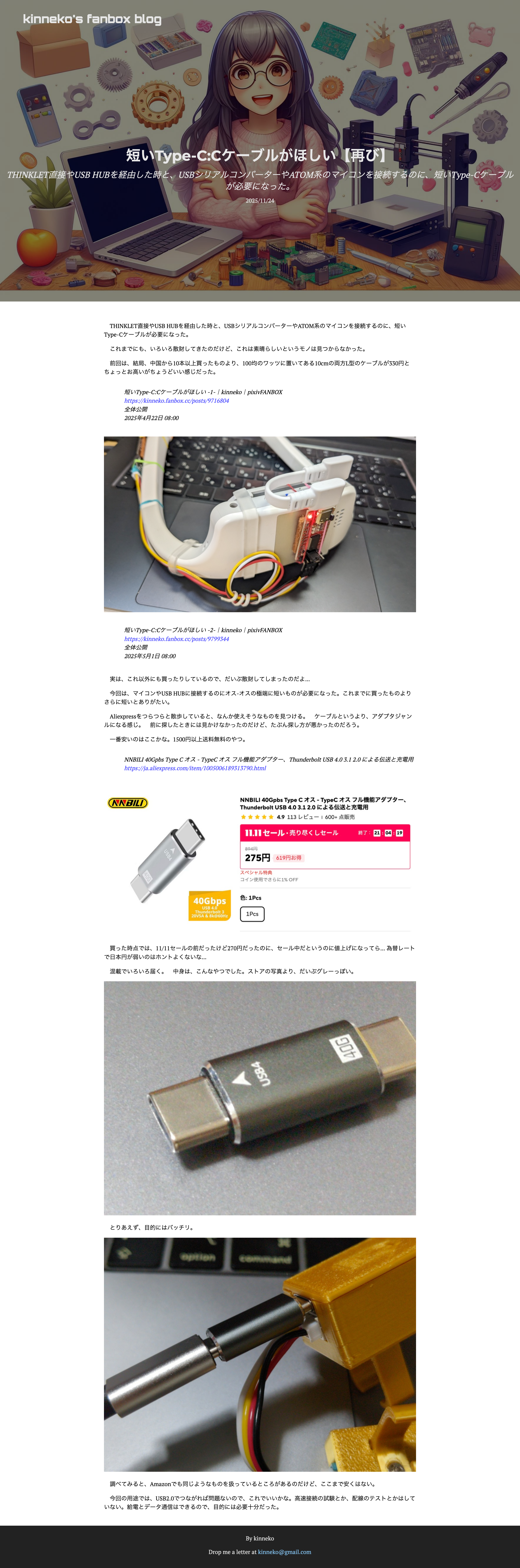
descriptionの中で改行したい。 brタグ入れたり、これやってみたけど、ダメだった。無理っぽいね。
description = """
THINKLETやUSB HUB経由で使うために、
短いType-Cケーブルを探したメモです。
いろいろ買って試した結果を書いています。
"""
定義はこれっぽい。
% grep -R post-description ./*
./themes/andromeda/templates/section.html:                            <span class="post-description">{{ page.description | safe }}</span>
post-description-multilineを追加する。
% vi ./themes/andromeda/templates/section.html:
<p class="post-description post-description-multiline">
    {{ page.description }}
</p>
cssはこのあたり。publicはserveが作っているテンポラリなので、次にビルドすると消える。
% find ./* | grep ".css"
./public/main.css
./themes/andromeda/sass/_index.scss
./themes/andromeda/sass/_colors.scss
./themes/andromeda/sass/main.scss
./themes/andromeda/sass/_footer.scss
./themes/andromeda/sass/_sitewide.scss
./themes/andromeda/sass/_page.scss
_custom.scss を新規作成する。ついでに、本文のフォントをもう少し大きくしたいので、その設定も入れる。
% vi ./themes/andromeda/sass/_custom.scss
// themes/andromeda/sass/_custom.scss

.post-description-multiline {
  white-space: pre-line;
}

article {
  font-size: 1.1rem;
  line-height: 1.9;
}
main.scssに読み込むように設定する。
% vi ./themes/andromeda/sass/main.scss
@import "custom";
serveを再起動してみる。反映されない...
brを強制するのもダメだわ。
% vi ./themes/andromeda/templates/section.html
                            <span class="post-description post-description-multiline">{{ page.description  | replace(from="\n", to="<br>") | safe }}</span>
本文のフォントサイズのほうは、body-containerのほうらしい。 こちらはこれで反映された。
% vi ./themes/andromeda/sass/_custom.scss
.body-container p {
  font-size: 1.3rem;
  line-height: 1.9;
}
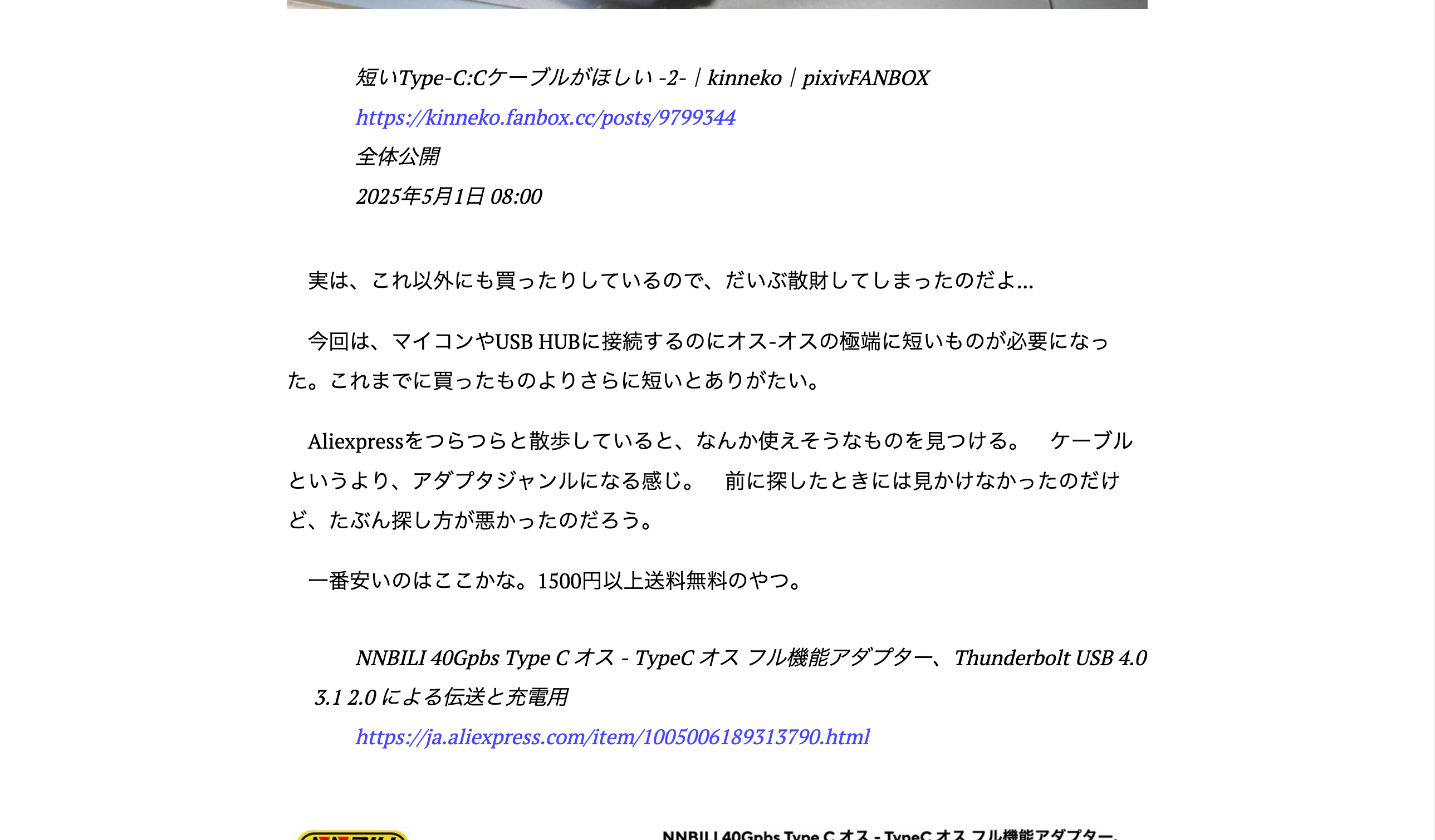
HTMLを見てみたけど、descriptionには、改行入っているけど、brはないね。
<span class="page-description lozad" data-loaded="true">THINKLETやUSB HUB経由で使うために、
短いType-Cケーブルを探したメモです。
いろいろ買って試した結果を書いています。
</span>
どうやら、white-space: normalが有効で、改行できていないようだ。
% vi ./themes/andromeda/sass/_custom.scss
.page-description {
  white-space: pre-line;
}
できたできた。
自動でできないのはつらいな...
オリジナル投稿: Zola使ってみる -3-|kinneko|pixivFANBOX
https://www.fanbox.cc/@kinneko/posts/10950121