
ちょっといろいろ面倒になったので、THINKLETに接続したらRaspiに動画をコピーするツールを作る。
経験的にはgvfsは不安定なところがあるので嫌い。前に検証したlibmtpでやりたい。
libmtpやってみる
https://kinneko.fanbox.cc/posts/10159358
libmtpやってみる -1- 2025年7月3日 08:00 LINKLETはMTPデバイスとして認識される。ちょっとこれをいじる必要が出てきたので、下調べ。MTPとか今更という気もするけど、しょうがないしょうがない。 Viewerをそのまま使うかな。環境はRaspiOS。使うのはPythonにしておくかな。 Python環境はこれでいいかな。 kinneko@pi3b:~ $ python --version Python 3.11.... 全体公開 kinneko
https://kinneko.fanbox.cc/posts/10159857
libmtpやってみる -2- 2025年7月4日 08:00 やっと動いたので、続き。 mtp-filetree: MTPデバイス上のファイルとフォルダをツリー形式で表示。 各ファイル/フォルダにはID (ハンドル) が付与される。 kinneko@pi3b:~ $ mtp-filetree Device 0 (VID=18d1 and PID=4ee1) is a Google Inc Nexus/Pixel (MTP). Attempting to connect device(s) Android... 全体公開 kinneko
実装は、都合によりPythonでやる必要があるので、GUIはpygameで。
libmtpの問題点としては、こんなところ。
・libmtpはファイルのmtime取得が弱いため、厳密な新着順は難しい(名前/サイズで擬似ソート)
・一部端末はmtp-thumbを返さない。その場合は初回クリック時のみ一時DLして縮小表示するなどが必要
・端末をロックすると転送が失敗する。画面ロック解除+MTP選択を維持する。これは原則スリープのないTHINKLETなので問題ない。
・GVFSやFUSEを使う場合と比べ、一覧の初期取得が遅い機種がある。これは仕様に近い挙動なので修正できない。
勝手にマウントしちゃって競合するので、gvfsは止める。
kinneko@pi3b:~ $ sudo apt purge -y gvfs gvfs-daemons gvfs-backends gvfs-fuse gvfs-libs
フォントとライブラリ入れる。
kinneko@pi3b:~ $ sudo apt install mtp-tools libmtp-runtime libheif1 fonts-noto-cjk
kinneko@pi3b:~ $ source $HOME/.local/bin/env
kinneko@pi3b:~ $ mkdir ~/android-photo-picker
kinneko@pi3b:~ $ cd ~/android-photo-picker
kinneko@pi3b:~/android-photo-picker $ uv init
Initialized project android-photo-picker
kinneko@pi3b:~/android-photo-picker $ uv add Pillow pillow-heif pygame
Using CPython 3.11.2 interpreter at: /usr/bin/python3.11
Creating virtual environment at: .venv
Resolved 4 packages in 3.99s
Prepared 1 package in 4.02s
Installed 3 packages in 144ms
pillow==11.3.0
pillow-heif==1.1.1
pygame==2.6.1
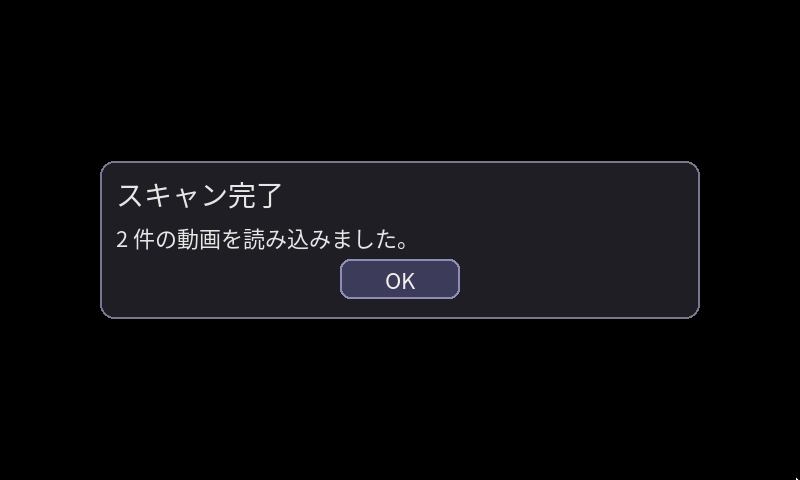
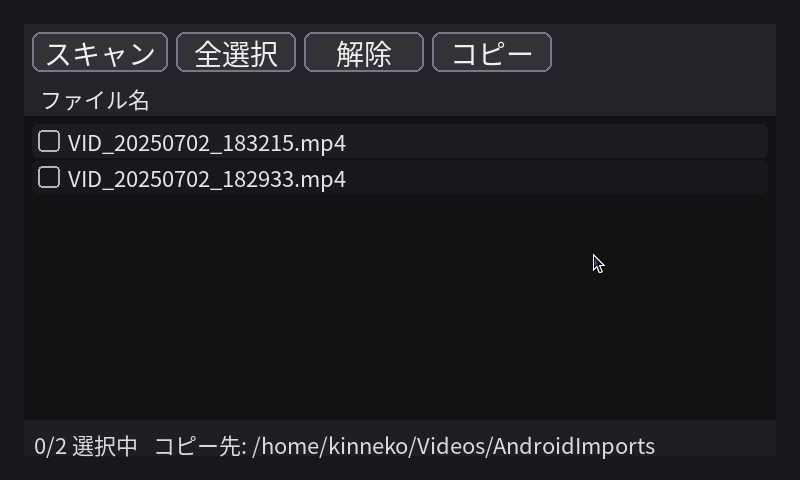
コードはこんな感じ。ファイルをリスト表示して、チェックを入れてコピーする。コピー先は~/Videos/AndroidImports/。進捗はプログレス。結果はダイアログ表示。操作はマウスで。
kinneko@pi3b:~/android-photo-picker $ vi android_photo_picker_mtp_libmtp.py
#!/usr/bin/env python3
# -*- coding: utf-8 -*-
"""
Android (MTP/libmtp) 動画セレクタ&コピー(Pygame / キーボード不要)
libmtp の mtp-tools を直接叩く。GVFS/FUSE不要。
リスト表示(チェック + ファイル名のみ)
ボタン(左→右):スキャン / 全選択 / 解除 / コピー
進捗は「全体バー」のみ(個別なし)
上書き対策:
バッチ内で「最終ファイル名」を予約して重複回避(完成ファイル/.part/予約の全てと衝突しない)
リネーム直前にも再確認して再解決(外部競合対策)
- 大きなファイル対策:
コピー先に .part で直接書き出し、成功時に原子的リネーム
自動リトライは完全撤廃(各ファイル1回だけ)
失敗時の .part は削除せず残す(既に同名 .part があれば .part2 …で回避)
"""
import os
import re
import sys
import subprocess
import shutil
import argparse
from pathlib import Path
import pygame
from pygame.locals import *
# ---- 設定 ----
VIDEO_EXTS = {".mp4", ".m4v", ".mov", ".3gp", ".webm", ".avi", ".mkv"}
DST_DIR = Path.home() / "Videos" / "AndroidImports"
MTP_ENV = {"LANG": "C"}  # 出力英語化でパース安定
# ===========================
# libmtp / mtp-tools backend
# ===========================
def _run(cmd: list[str]) -> str:
return subprocess.check_output(
cmd, text=True, env={**os.environ, **MTP_ENV}, stderr=subprocess.STDOUT
)
def mtp_ready() -> bool:
try:
out = _run(["mtp-detect"])
return "Device recognized as MTP" in out
except Exception:
return False
def _build_id2path_from_filetree() -> dict[int, str]:
try:
lines = _run(["mtp-filetree"]).splitlines()
except Exception:
return {}
id2path = {}
stack: list[tuple[int, str, int]] = []
for raw in lines:
line = raw.rstrip()
if not line or line.startswith(("Device", "Attempting", "Android device", "OK.", "Storage:")):
if line.startswith("Storage:"):
stack.clear()
continue
mA = re.match(r"^(\d+):\s+(.*)$", line)
if mA:
fid = int(mA.group(1)); full = mA.group(2).strip()
id2path[fid] = full
continue
mB = re.match(r"^(\s*)(\d+)\s+(.+)$", line)
if mB:
indent = len(mB.group(1)); num = int(mB.group(2)); name = mB.group(3).strip()
if Path(name).suffix:  # ファイル行は除外
continue
while stack and stack[-1][2] >= indent:
stack.pop()
parent_path = "/".join([s[1] for s in stack if s[1]])
full = (parent_path + "/" + name).lstrip("/")
stack.append((num, name, indent))
if not full.startswith("/"): full = "/" + full
id2path[num] = full
return id2path
def _parse_files_and_video_counts_from_mtp_files() -> tuple[list[dict], dict[int, int]]:
try:
out = _run(["mtp-files"]).splitlines()
except Exception:
return [], {}
items = []; cur = {}; parent_video_count = {}; cur_parent = None
for line in out:
if "File ID:" in line:
if cur: items.append(cur)
cur = {}; m = re.search(r"File ID:\s*(\d+)", line)
if m: cur["id"] = int(m.group(1))
elif "Parent ID:" in line:
m = re.search(r"Parent ID:\s*(\d+)", line)
if m: cur["parent"] = int(m.group(1)); cur_parent = cur["parent"]
elif "File name:" in line:
name = line.split("File name:", 1)[1].strip()
cur["name"] = name
if cur_parent is not None and Path(name).suffix.lower() in VIDEO_EXTS:
parent_video_count[cur_parent] = parent_video_count.get(cur_parent, 0) + 1
elif "Size:" in line or "File size" in line:
m = re.search(r"(\d+)", line)
if m: cur["size"] = int(m.group(1))
if cur: items.append(cur)
return items, parent_video_count
def _parse_filetree_nodes() -> list[dict]:
try:
lines = _run(["mtp-filetree"]).splitlines()
except Exception:
return []
nodes = []
for raw in lines:
line = raw.rstrip()
if not line or line.startswith(("Device", "Attempting", "Android device", "OK.", "Storage:")):
continue
m = re.match(r"^(\s*)(\d+)\s+(.+)$", line)
if not m: continue
indent = len(m.group(1)); num = int(m.group(2)); name = m.group(3).strip()
is_dir = (Path(name).suffix == "")
nodes.append({"id": num, "name": name, "is_dir": is_dir, "indent": indent})
return nodes
def _fallback_video_counts_from_filetree() -> dict[int, int]:
nodes = _parse_filetree_nodes()
counts: dict[int, int] = {}; stack: list[dict] = []
for n in nodes:
if n["is_dir"]:
while stack and stack[-1]["indent"] >= n["indent"]:
stack.pop()
stack.append(n)
else:
if Path(n["name"]).suffix.lower() in VIDEO_EXTS and stack:
parent_id = stack[-1]["id"]
counts[parent_id] = counts.get(parent_id, 0) + 1
return counts
def mtp_auto_pick_video_parents(path_hint: str | None = None,
allow_nondcim: bool = False) -> list[int]:
id2path = _build_id2path_from_filetree()
_, pvcount = _parse_files_and_video_counts_from_mtp_files()
if not pvcount:
pvcount = _fallback_video_counts_from_filetree()
if not pvcount: return []
def is_dcim(p: str) -> bool:
return bool(re.search(r"/DCIM(/|$)", p, re.I))
parents = set(pvcount.keys())
if path_hint:
ph = path_hint.lower()
cand = [pid for pid in parents if ph in id2path.get(pid, "").lower()]
if cand: parents = set(cand)
if not allow_nondcim:
dcim_parents = [pid for pid in parents if is_dcim(id2path.get(pid, ""))]
if dcim_parents: parents = set(dcim_parents)
scored = []
for pid in parents:
path = id2path.get(pid, ""); base = pvcount.get(pid, 0)
bonus = 10_000 if is_dcim(path) else 0
scored.append((bonus + base, pid))
scored.sort(reverse=True)
return [pid for _, pid in scored if pvcount.get(pid, 0) >= 1]
def mtp_list_videos_from_parents(parent_ids: list[int]) -> list[dict]:
items, _ = _parse_files_and_video_counts_from_mtp_files()
videos = []
if items:
for x in items:
if x.get("parent") in parent_ids and Path(x.get("name","")).suffix.lower() in VIDEO_EXTS:
videos.append({"id": x["id"], "name": x["name"], "size": int(x.get("size", 0)), "parent": x["parent"]})
if not videos:
nodes = _parse_filetree_nodes(); stack: list[dict] = []
for n in nodes:
if n["is_dir"]:
while stack and stack[-1]["indent"] >= n["indent"]:
stack.pop()
stack.append(n)
else:
if Path(n["name"]).suffix.lower() in VIDEO_EXTS and stack and stack[-1]["id"] in parent_ids:
videos.append({"id": n["id"], "name": n["name"], "size": 0, "parent": stack[-1]["id"]})
videos.sort(key=lambda d: d["name"], reverse=True)
return videos
def mtp_getfile_with_progress(file_id: int, dst_path: Path, progress_cb) -> bool:
"""
mtp-getfile の Progress を読み取り、progress_cb(done,total,pct) を随時呼ぶ。
"""
try:
proc = subprocess.Popen(
["mtp-getfile", str(file_id), str(dst_path)],
stdout=subprocess.PIPE, stderr=subprocess.STDOUT,
text=True, env={**os.environ, **MTP_ENV}, bufsize=1
)
for line in proc.stdout:
m = re.search(r"Progress:\s*(\d+)\s+of\s+(\d+)\s+\((\d+)%\)", line)
if m:
done = int(m.group(1)); total = int(m.group(2)); pct = int(m.group(3))
progress_cb(done, total, pct)
rc = proc.wait()
return rc == 0 and dst_path.exists() and dst_path.stat().st_size > 0
except Exception:
return False
# =========
# フォント
# =========
def get_jp_font(size=22) -> pygame.font.Font:
# fc-match 優先
def fc_match(names: list[str]) -> str | None:
for name in names:
try:
out = subprocess.check_output(["fc-match", "-v", name], text=True, stderr=subprocess.DEVNULL)
for line in out.splitlines():
if line.strip().startswith("file:"):
p = line.split(":", 1)[1].strip().strip('"')
if os.path.exists(p): return p
except Exception:
pass
return None
fc_names = ["Noto Sans CJK JP", "Noto Sans CJK", "IPAexGothic", "IPAGothic", "VL Gothic"]
p = fc_match(fc_names)
if p: return pygame.font.Font(p, size)
# フォールバック
for c in [
"/usr/share/fonts/opentype/noto/NotoSansCJKjp-Regular.otf",
"/usr/share/fonts/opentype/noto/NotoSansCJK-Regular.ttc",
"/usr/share/fonts/opentype/ipaexfont/ipaexg.ttf",
"/usr/share/fonts/truetype/vlgothic/VL-Gothic-Regular.ttf",
]:
if os.path.exists(c): return pygame.font.Font(c, size)
return pygame.font.SysFont(None, size)
# =========
# ユーティリティ
# =========
def ensure_dst(dst: Path): dst.mkdir(parents=True, exist_ok=True)
def check_free_space(dir_path: Path, need_bytes: int) -> bool:
try:
usage = shutil.disk_usage(dir_path)
return usage.free >= need_bytes + (64 * 1024 * 1024)  # +64MBバッファ
except Exception:
return True # 取得できない場合は通す
def choose_unique_name_reserved(final_dir: Path, name: str, reserved: set[str]) -> Path:
"""
予約集合も考慮してユニーク名を決める。
完成ファイル / .part / 予約の全てと衝突しないことを確認してから予約に追加。
"""
base = final_dir / name
stem, suf = base.stem, base.suffix
k = 0
while True:
cand = final_dir / (f"{stem}{suf}" if k == 0 else f"{stem}_{k}{suf}")
cand_part = Path(str(cand) + ".part")
if (not cand.exists()) and (not cand_part.exists()) and (str(cand) not in reserved):
reserved.add(str(cand))
return cand
k += 1
# =========
# UI(リスト表示)
# =========
class ListView:
"""チェック + ファイル名のみ。クリックはチェックと名前の両方で反応。"""
def __init__(self, entries: list[dict], font, row_h=36, margin=8):
self.entries = entries
self.font = font
self.row_h = row_h
self.margin = margin
self.scroll = 0
self.selected: set[int] = set()
def on_event(self, e, area: pygame.Rect):
if e.type == MOUSEBUTTONDOWN:
if e.button == 4:
self.scroll = min(self.scroll + self.row_h, 0)
elif e.button == 5:
self.scroll -= self.row_h
elif e.button == 1 and area.collidepoint(e.pos):
self._click(e.pos, area)
def _click(self, pos, area: pygame.Rect):
y_rel = pos[1] - (area.y + self.row_h + self.margin) - self.scroll
idx = int(y_rel // self.row_h)
if idx < 0 or idx >= len(self.entries): return
r = pygame.Rect(area.x + 8, area.y + self.row_h + self.margin + self.scroll + idx*self.row_h,
area.w - 16, self.row_h - 2)
cb = pygame.Rect(r.x + 6, r.y + 6, 22, 22)
text_rect = pygame.Rect(cb.right + 8, r.y, r.w - (cb.width + 20), r.h)
if cb.collidepoint(pos) or text_rect.collidepoint(pos):
fid = self.entries[idx]["id"]
if fid in self.selected: self.selected.remove(fid)
else: self.selected.add(fid)
def draw(self, screen: pygame.Surface, area: pygame.Rect):
pygame.draw.rect(screen, (18,18,20), area)
header = pygame.Rect(area.x, area.y, area.w, self.row_h)
pygame.draw.rect(screen, (35,35,42), header)
h_name = self.font.render("ファイル名", True, (230,230,230))
screen.blit(h_name, (header.x + 16, header.y + (self.row_h - h_name.get_height())//2))
y = header.bottom + self.margin + self.scroll
for i, e in enumerate(self.entries):
r = pygame.Rect(area.x + 8, y, area.w - 16, self.row_h - 2)
color = (28,28,33) if i % 2 == 0 else (24,24,28)
pygame.draw.rect(screen, color, r, border_radius=6)
cb = pygame.Rect(r.x + 6, r.y + 6, 22, 22)
pygame.draw.rect(screen, (180,180,190), cb, 2, border_radius=4)
if e["id"] in self.selected:
pygame.draw.line(screen, (0,200,255), (cb.x+4, cb.y+12), (cb.x+9, cb.y+18), 3)
pygame.draw.line(screen, (0,200,255), (cb.x+9, cb.y+18), (cb.x+18, cb.y+6), 3)
name_surf = self.font.render(e["name"], True, (230,230,230))
screen.blit(name_surf, (cb.right + 8, r.y + (r.h - name_surf.get_height())//2))
y += self.row_h
content_h = (len(self.entries) * self.row_h) + self.margin
visible_h = area.h - self.row_h - self.margin*2
self.scroll = max(min(self.scroll, 0), min(0, visible_h - content_h))
if content_h > visible_h:
bar_h = max(30, int(visible_h * (visible_h / content_h)))
hidden = content_h - visible_h
pos = int((-self.scroll / hidden) * (visible_h - bar_h))
sb = pygame.Rect(area.right - 8, header.bottom + self.margin + pos, 6, bar_h)
pygame.draw.rect(screen, (100,100,120), sb, border_radius=3)
# =========
# 進捗描画(全体バーのみ)
# =========
def draw_progress_overlay(screen: pygame.Surface, big, overall_pct: int):
W, H = screen.get_size()
overlay = pygame.Surface((W, H), pygame.SRCALPHA); overlay.fill((0, 0, 0, 160))
screen.blit(overlay, (0,0))
panel_w, panel_h = int(W * 0.8), 120
panel = pygame.Rect((W - panel_w)//2, (H - panel_h)//2, panel_w, panel_h)
pygame.draw.rect(screen, (30,30,36), panel, border_radius=14)
pygame.draw.rect(screen, (120,120,140), panel, 2, border_radius=14)
title = big.render("コピー中…", True, (230,230,230))
screen.blit(title, (panel.x + 16, panel.y + 12))
bar = pygame.Rect(panel.x + 16, panel.y + 60, panel.w - 32, 20)
pygame.draw.rect(screen, (55,55,70), bar, border_radius=8)
fill = pygame.Rect(bar.x, bar.y, int(bar.w * (overall_pct/100.0)), bar.h)
pygame.draw.rect(screen, (0,200,160), fill, border_radius=8)
# =========
# モーダルダイアログ(OKのみ)
# =========
class ModalOK:
def __init__(self, font, big):
self.font = font; self.big = big
def show(self, screen: pygame.Surface, title: str, message: str):
W, H = screen.get_size()
def wrap(text, max_px):
lines = []
for para in text.split("\n"):
cur = ""
for w in para.split(" "):
test = (cur + " " + w).strip()
if self.font.size(test)[0] <= max_px: cur = test
else:
if cur: lines.append(cur)
cur = w
if cur: lines.append(cur)
return lines
overlay = pygame.Surface((W, H), pygame.SRCALPHA)
clock = pygame.time.Clock()
panel_w = int(W * 0.75); text_max_w = panel_w - 48
lines = wrap(message, text_max_w)
panel_h = 120 + len(lines)*(self.font.get_height()+6)
panel = pygame.Rect((W - panel_w)//2, (H - panel_h)//2, panel_w, panel_h)
btn = pygame.Rect(0,0,120,40); btn.center = (panel.centerx, panel.bottom - 40)
running = True
while running:
for e in pygame.event.get():
if e.type == QUIT:
pygame.quit(); sys.exit(0)
if e.type == KEYDOWN and e.key in (K_RETURN, K_SPACE, K_ESCAPE):
running = False
if e.type == MOUSEBUTTONDOWN and e.button == 1 and btn.collidepoint(e.pos):
running = False
overlay.fill((0,0,0,160)); screen.blit(overlay, (0,0))
pygame.draw.rect(screen, (30,30,36), panel, border_radius=14)
pygame.draw.rect(screen, (120,120,140), panel, 2, border_radius=14)
tt = self.big.render(title, True, (230,230,230)); screen.blit(tt, (panel.x + 16, panel.y + 12))
y = panel.y + 60
for ln in lines:
surf = self.font.render(ln, True, (230,230,230)); screen.blit(surf, (panel.x + 16, y))
y += self.font.get_height() + 6
pygame.draw.rect(screen, (60,60,90), btn, border_radius=10)
pygame.draw.rect(screen, (140,140,180), btn, 2, border_radius=10)
ok = self.font.render("OK", True, (240,240,240)); screen.blit(ok, ok.get_rect(center=btn.center))
pygame.display.flip(); clock.tick(60)
# =========
# メイン
# =========
def main():
ap = argparse.ArgumentParser()
ap.add_argument("--fullscreen", action="store_true")
ap.add_argument("--borderless", action="store_true")
ap.add_argument("--size", type=str)
ap.add_argument("--folder-id", type=int)
ap.add_argument("--path", type=str)
ap.add_argument("--allow-nondcim", action="store_true")
ap.add_argument("--debug", action="store_true")
ap.add_argument("--font", type=str)
args = ap.parse_args()
pygame.init()
# フォント
if args.font and os.path.exists(args.font):
font = pygame.font.Font(args.font, 22); big = pygame.font.Font(args.font, 28)
else:
font = get_jp_font(22); big = get_jp_font(28)
# ウィンドウ
if args.size:
W, H = map(int, args.size.lower().split("x"))
screen = pygame.display.set_mode((W, H)); SAFE = pygame.Rect(8, 8, W - 16, H - 16)
elif args.fullscreen:
screen = pygame.display.set_mode((0, 0), pygame.FULLSCREEN)
W, H = screen.get_size(); inset = 24
SAFE = pygame.Rect(inset, inset, W - 2*inset, H - 2*inset)
elif args.borderless:
info = pygame.display.Info(); margin = 32
screen = pygame.display.set_mode((info.current_w - margin*2, info.current_h - margin*2), pygame.NOFRAME)
SAFE = pygame.Rect(16, 16, screen.get_width() - 32, screen.get_height() - 32)
else:
screen = pygame.display.set_mode((1280, 800)); SAFE = pygame.Rect(8, 8, 1280 - 16, 800 - 16)
pygame.display.set_caption("Android Video Picker (libmtp)")
# レイアウト
toolbar = pygame.Rect(SAFE.x, SAFE.y, SAFE.w, 56)
list_area = pygame.Rect(SAFE.x, toolbar.bottom, SAFE.w, SAFE.h - 56 - 36)
footer = pygame.Rect(SAFE.x, SAFE.bottom - 36, SAFE.w, 36)
entries: list[dict] = []
view = ListView(entries, font, row_h=36, margin=8)
modal = ModalOK(font, big)
# ボタン(左→右:スキャン / 全選択 / 解除 / コピー)
class Button:
def __init__(self, label: str, handler):
self.label = label; self.handler = handler
self.rect = pygame.Rect(0,0,0,0); self.hover = False
def draw(self, screen, font):
pygame.draw.rect(screen, (50,50,55), self.rect, border_radius=8)
if self.hover: pygame.draw.rect(screen, (90,90,110), self.rect, border_radius=8)
pygame.draw.rect(screen, (120,120,140), self.rect, 2, border_radius=8)
text = font.render(self.label, True, (240,240,240))
screen.blit(text, text.get_rect(center=self.rect.center))
def handle(self, e):
if e.type == MOUSEMOTION:
self.hover = self.rect.collidepoint(e.pos)
elif e.type == MOUSEBUTTONDOWN and e.button == 1 and self.rect.collidepoint(e.pos):
self.handler()
def layout_buttons(area: pygame.Rect, font, buttons, gap=8, h=40, pad=8):
x, y = area.x + pad, area.y + pad
line_h = h + gap
for b in buttons:
w = max(120, font.size(b.label)[0] + 24)
if x + w + pad > area.right:
x = area.x + pad; y += line_h
b.rect = pygame.Rect(x, y, w, h)
x += w + gap
return (y + h + pad) - area.y
def do_scan():
nonlocal entries
if not mtp_ready():
modal.show(screen, "エラー", "MTP が見つかりません。Android側で『ファイル転送(MTP)』+ロック解除。"); return
if args.folder_id:
parents = [args.folder_id]
else:
parents = mtp_auto_pick_video_parents(args.path, allow_nondcim=args.allow_nondcim)
if not parents:
modal.show(screen, "情報", "動画を含む親フォルダが見つかりません。--folder-id か --path を指定してください。"); return
if args.debug:
id2path = _build_id2path_from_filetree(); _, pv_mtp = _parse_files_and_video_counts_from_mtp_files(); pv_ft = _fallback_video_counts_from_filetree()
print("[debug] parents:", parents, file=sys.stdout)
for pid in parents:
print(f"[debug] {pid}: {id2path.get(pid,'?')}  mtp-files={pv_mtp.get(pid,0)}  filetree={pv_ft.get(pid,0)}", file=sys.stdout)
entries = mtp_list_videos_from_parents(parents)
view.entries = entries; view.selected.clear(); view.scroll = 0
modal.show(screen, "スキャン完了", f"{len(entries)} 件の動画を読み込みました。")
def do_select_all(): view.selected.update([e["id"] for e in view.entries])
def do_clear(): view.selected.clear()
def draw_frame(overall_pct=None):
screen.fill((24,24,28))
toolbar_h = layout_buttons(toolbar, big, buttons)
list_area_local = pygame.Rect(SAFE.x, SAFE.y + toolbar_h, SAFE.w, SAFE.h - toolbar_h - 36)
pygame.draw.rect(screen, (35,35,42), pygame.Rect(SAFE.x, SAFE.y, SAFE.w, toolbar_h))
for b in buttons: b.draw(screen, big)
view.draw(screen, list_area_local)
pygame.draw.rect(screen, (30,30,36), footer)
left = font.render(f"{len(view.selected)}/{len(view.entries)} 選択中   コピー先: {DST_DIR}", True, (220,220,220))
screen.blit(left, (footer.x + 10, footer.y + 8))
if overall_pct is not None:
draw_progress_overlay(screen, big, overall_pct)
pygame.display.flip()
return list_area_local
def do_copy():
if not view.selected:
modal.show(screen, "情報", "選択されていません。"); return
ensure_dst(DST_DIR)
# 事前空き容量チェック(サイズが取れているもののみ合算)
need = sum(e.get("size", 0) for e in view.entries if e["id"] in view.selected and e.get("size"))
if need and not check_free_space(DST_DIR, need):
modal.show(screen, "エラー", "コピー先の空き容量が不足しています。"); return
target = [e for e in view.entries if e["id"] in view.selected]
total_cnt = len(target); ok = fail = 0
cur_idx = 0; overall_pct = 0
clock = pygame.time.Clock()
# バッチ内 予約セット(完成名)
reserved_final_names: set[str] = set()
for e in target:
cur_idx += 1
# 最終名を予約込みで決定
final_path = choose_unique_name_reserved(DST_DIR, e["name"], reserved_final_names)
# .part を決定(既存があれば .part2, .part3 …)
part_path = Path(str(final_path) + ".part")
if part_path.exists():
i = 1
while True:
alt = Path(str(final_path) + f".part{i}")
if not alt.exists():
part_path = alt; break
i += 1
# 進捗更新コールバック(全体のみ)
def on_prog(done, total, pct):
nonlocal overall_pct
overall_pct = int(((cur_idx-1) + (pct/100.0)) / total_cnt * 100)
draw_frame(overall_pct)
for event in pygame.event.get():
if event.type == QUIT:
pygame.quit(); sys.exit(0)
clock.tick(60)
# 単回試行(リトライなし)
ok_one = mtp_getfile_with_progress(e["id"], part_path, on_prog)
if ok_one:
try:
# リネーム直前に衝突再確認(外部要因で埋まる可能性)
if final_path.exists():
reserved_final_names.discard(str(final_path))
final_path = choose_unique_name_reserved(DST_DIR, e["name"], reserved_final_names)
part_path.replace(final_path)  # 原子的に完成名へ
ok += 1
except Exception:
# リネーム失敗:.part は残す
fail += 1
else:
# 失敗:.part を残す(消さない)
fail += 1
overall_pct = int(cur_idx / total_cnt * 100)
draw_frame(overall_pct); clock.tick(60)
modal.show(screen, "コピー完了", f"{ok} 成功 / {fail} 失敗(失敗時の .part は残しています) → {DST_DIR}")
# ボタン生成(順序固定:スキャンを一番左)
buttons = [
Button("スキャン", do_scan),
Button("全選択", do_select_all),
Button("解除",   do_clear),
Button("コピー", do_copy),
]
# 初期描画 → 自動スキャン
draw_frame()
do_scan()
# メインループ
running = True
clock = pygame.time.Clock()
while running:
for e in pygame.event.get():
if e.type == QUIT:
running = False
for b in buttons: b.handle(e)
view.on_event(e, list_area)
# 再レイアウト・描画
toolbar_h = layout_buttons(toolbar, big, buttons)
list_area = pygame.Rect(SAFE.x, SAFE.y + toolbar_h, SAFE.w, SAFE.h - toolbar_h - 36)
footer = pygame.Rect(SAFE.x, SAFE.bottom - 36, SAFE.w, 36)
screen.fill((24, 24, 28))
pygame.draw.rect(screen, (35, 35, 42), pygame.Rect(SAFE.x, SAFE.y, SAFE.w, toolbar_h))
for b in buttons: b.draw(screen, big)
view.draw(screen, list_area)
pygame.draw.rect(screen, (30, 30, 36), footer)
left = font.render(f"{len(view.selected)}/{len(view.entries)} 選択中   コピー先: {DST_DIR}", True, (220, 220, 220))
screen.blit(left, (footer.x + 10, footer.y + 8))
pygame.display.flip()
clock.tick(60)
pygame.quit()
if __name__ == "__main__":
main()
実行。
kinneko@pi3b:~/android-photo-picker $ uv run python ./android_photo_picker_mtp_libmtp.py --fullscreen
pygame 2.6.1 (SDL 2.28.4, Python 3.11.2)
Hello from the pygame community. https://www.pygame.org/contribute.html
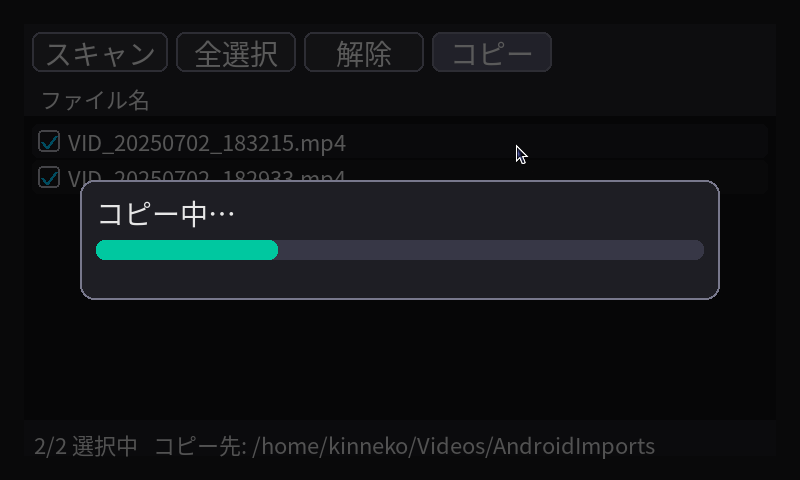
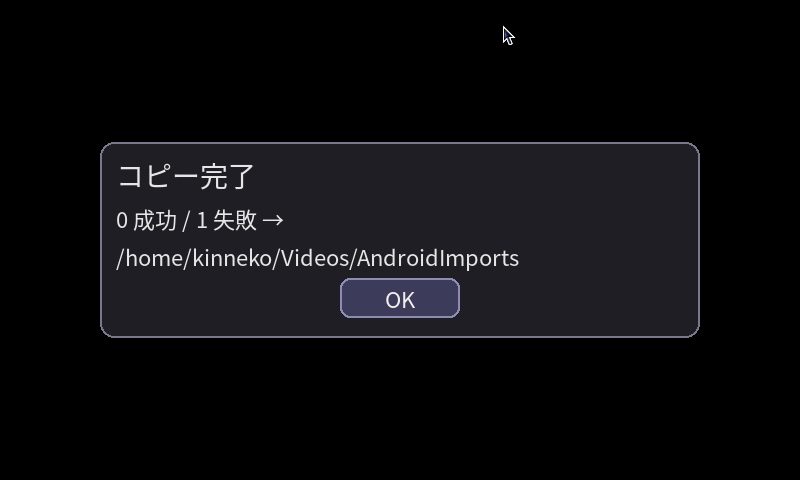
なんか、LINKLETからMTPで転送(libmtp使用)すると、大きめの動画ファイルとか末尾が転送失敗して壊れる感じがするのだけど、気のせいか?
ちょっと対策入れたら安定したようだ。
とりあえず、こんなもんかな。
オリジナル投稿:
pygameでMTPコピーツール|kinneko|pixivFANBOX
https://kinneko.fanbox.cc/posts/10666402