

点灯はできたので、つぎにやるのは順番的には文字表示かな。
8x8では日本語を出すのはかなりつらそう。
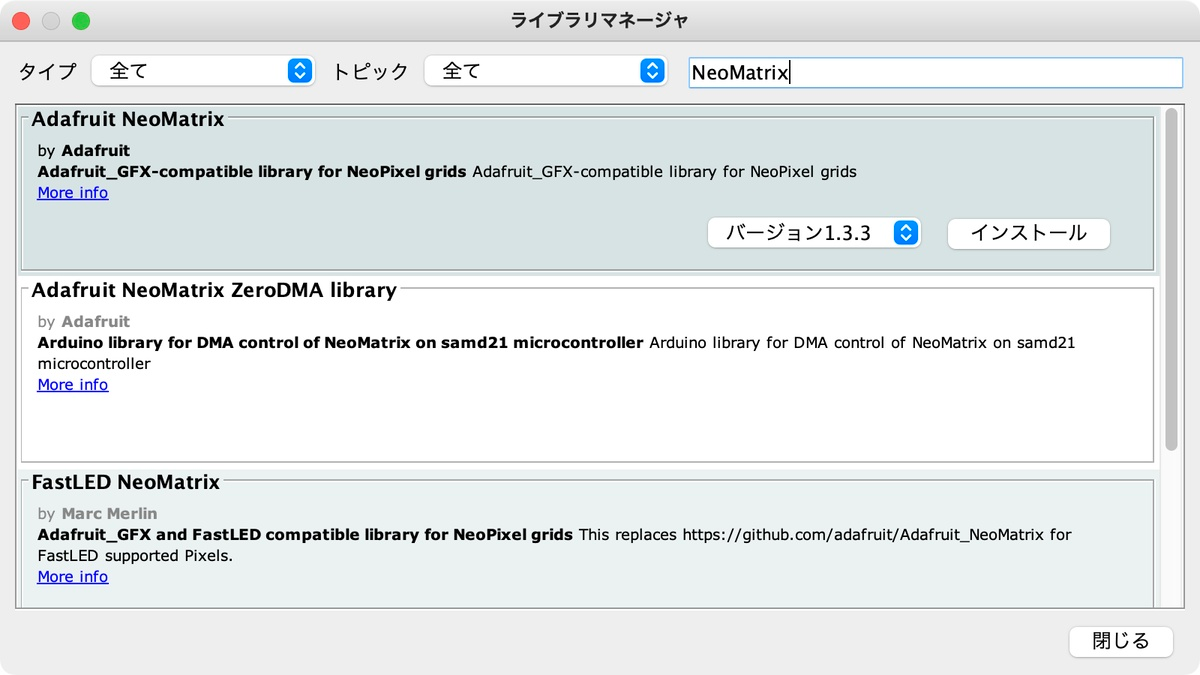
とりあえず英語で表示させてみる。Adafruit_NeoMatrixを入れる。
LEDのマトリックスは、ZIGZAG配列かな?
#include <Adafruit_GFX.h>
#include <Adafruit_NeoMatrix.h>
#include <Adafruit_NeoPixel.h>
#define PIN 26  // Puzzle Unitの信号ピン(PORT.A)
Adafruit_NeoMatrix matrix = Adafruit_NeoMatrix(
8, 8, PIN, // 横×縦×ピン
NEO_MATRIX_TOP + NEO_MATRIX_LEFT +
NEO_MATRIX_ROWS + NEO_MATRIX_ZIGZAG,
NEO_GRB + NEO_KHZ800);
int x = 8;
const char* text = " SUSHIKUITE-! ";
void setup() {
matrix.begin();
matrix.setTextWrap(false);
matrix.setBrightness(20);
matrix.setTextColor(matrix.Color(255, 255, 0));  // 黄色
}
void loop() {
matrix.fillScreen(0);
matrix.setCursor(x, 0);  // y=0で横スクロール
matrix.print(text);
matrix.show();
delay(100);
x--;
if (x < -((int)strlen(text) * 6)) {
x = 8;
}
}
あー、1行づつ流れが逆になっている。配列は、PROGRESSIVEか。以下を書き換え。
NEO_MATRIX_ROWS + NEO_MATRIX_PROGRESSIVE,
Unit Puzzleで英字表示 - YouTube
https://www.youtube.com/watch?v=gSUn1i3Fbmo
ひらがなで、文字も限られるので文字のマトリックス情報を内部に保持して「すしくいてー!」を日本語で表示できるようにしたい。
表示データは自分で作るか。
#include <Adafruit_NeoPixel.h>
#define LED_PIN       26
#define MATRIX_WIDTH  8
#define MATRIX_HEIGHT 8
#define NUM_LEDS      (MATRIX_WIDTH * MATRIX_HEIGHT)
Adafruit_NeoPixel matrix(NUM_LEDS, LED_PIN, NEO_GRB + NEO_KHZ800);
// 「す」
const char* font_su[8] = {
"     ## ",
"####### ",
"    ##  ",
"   ###  ",
" ## ##  ",
"  ###   ",
"  ##    ",
" #      "
};
// 「し」
const char* font_shi[8] = {
"##      ",
"##      ",
" ##     ",
" ##     ",
" ##     ",
" ##     ",
"  ##    ",
"   #### "
};
// 「く」
const char* font_ku[8] = {
"    ##  ",
"  ##    ",
" ##     ",
"##      ",
" ##     ",
"  ##    ",
"    ##  ",
"     ## "
};
// 「い」
const char* font_i[8] = {
"#       ",
"##   #  ",
"##   ## ",
"##   ## ",
"##    # ",
"##  #   ",
" # #    ",
"  ##    "
};
// 「て」
const char* font_te[8] = {
"########",
"     ## ",
"   ##   ",
"  ##    ",
"   ##   ",
"    ##  ",
"     ## ",
"      # "
};
// 「ー」 (長音記号)
const char* font_longdash[8] = {
"        ",
"        ",
"        ",
"####### ",
" #######",
"        ",
"        ",
"        "
};
// 「!」 (感嘆符)
const char* font_ex[8] = {
"     ## ",
"    ##  ",
"    ##  ",
"   ##   ",
"   ##   ",
"        ",
"  ##    ",
"  ##    "
};
// 表示したいメッセージをフォントデータのポインタ配列で定義
const char** message[] = {
font_su, font_shi, font_ku, font_i, font_te, font_longdash, font_ex
};
const int messageLength = sizeof(message) / sizeof(message[0]);
unsigned long lastUpdate = 0;
const int scrollSpeed = 120; // スクロール速度 (ms)
int scrollPos = -MATRIX_WIDTH;
// LEDのインデックスを取得する関数(直線的なマトリクス配線用)
int getLedIndex(int x, int y) {
return y * MATRIX_WIDTH + x;
}
void setup() {
matrix.begin();
matrix.setBrightness(20);
matrix.clear();
matrix.show();
}
void loop() {
unsigned long now = millis();
if (now - lastUpdate > scrollSpeed) {
lastUpdate = now;
matrix.clear();
for (int x = 0; x < MATRIX_WIDTH; x++) { // 画面の各列をループ
int pos = scrollPos + x;
if (pos < 0) continue;
int charIndex = pos / MATRIX_WIDTH;
int colInChar = pos % MATRIX_WIDTH;
if (charIndex < messageLength) {
// 表示する文字のフォントマップを取得
const char** fontMap = message[charIndex];
for (int y = 0; y < MATRIX_HEIGHT; y++) { // 画面の各行をループ
// (y, colInChar)の位置の文字が'#'かどうかをチェック
if (fontMap[y][colInChar] == '#') {
matrix.setPixelColor(getLedIndex(x, y), matrix.Color(255, 255, 0)); // 黄色
}
}
}
}
matrix.show();
scrollPos++;
// スクロールが完全に終わったらリセット
if (scrollPos >= messageLength * MATRIX_WIDTH) {
scrollPos = -MATRIX_WIDTH;
}
}
}
Unit Puzzleで日本語表示 - YouTube
https://www.youtube.com/watch?v=yjNUVWMkzgk
美咲フォントをArudinoで使えるライブラリにしてくれている人がいるみたい。単位文字が7×7か。ちょっと8x8フルフル使えないのがもったいないかな。
LEDの視認性は、10/255でも十分な感じ。5/255にすると、だいぶ暗いけど、見えないわけではない。
matrix.setBrightness(10);
フォントバラさないで、生データで長いの記述するか変換するかして、ズラして流したほうがいいかな。
いずれにせよ、Unit Puzzle1つでは面白みがイマイチ。せめて、4つくらいあるといいかも。
とりあえず用途は思いつかないので、買わないけどw
100円投げ銭 https://kinneko.booth.pm/items/1963720
オリジナル投稿:
M5Stack Puzzle Unit使ってみる? -2-|kinneko|pixivFANBOX
https://kinneko.fanbox.cc/posts/10282674