


とりあえず問題なく起動はできた。初期不良はなさそうだ。返品は面倒なので、製品の品質がいいのは助かる。
シャットダウンコマンドを使うと再起動してきちゃうよ。でも、コンソールログが取れてよかった。
ブートローダーはubootだった。まぁ、そうだろうけど。なんかボタン押したりすると、ubootのプロセスをインタラプトしたりできないだろうか?
root@m5stack-LLM:~# shutdown -h now
[FAILED] Failed unmounting /tmp.
[ 6402.793202] reboot: Power down
[ 6402.796286] Kernel panic - not syncing: Attempted to kill init! exitcode=0x00
[ 6402.796286]
[ 6402.805425] CPU: 0 PID: 1 Comm: systemd-shutdow Tainted: G O 1
[ 6402.813427] Hardware name: axera,ax620e (DT)
[ 6402.817697] Call trace:
[ 6402.820153] dump_backtrace+0x0/0x120
[ 6402.823817] show_stack+0x14/0x20
[ 6402.827135] dump_stack+0x98/0xbc
[ 6402.830452] panic+0x11c/0x260
[ 6402.833508] do_exit+0x8ec/0x940
[ 6402.836739] __se_sys_reboot+0x138/0x210
[ 6402.840663] __arm64_sys_reboot+0x18/0x20
[ 6402.844673] el0_svc_handler+0x6c/0xd8
[ 6402.848422] el0_svc+0x8/0xc
[ 6402.851306] kernel panic dump : 2023-8-21 22:58:22
[ 6406.030479] Kernel Offset: disabled
[ 6406.033987] CPU features: 0x0,00002000
[ 6406.037736] Memory Limit: 1024 MB
[ 6406.047566] Rebooting in 5 seconds..
V0EUEURSE/TC:0 0 ax_huk_read:115 ax efuse EFUSE_BONDOPT_BLK:0x00000000, EFUSE_Ss
E/TC:0 0 tee_otp_get_hw_unique_key:225
Unique key is not fetched from the platform.
U-Boot 2020.04 (Nov 20 2024 - 14:43:23 +0800)
U-Boot code: 5C000400 -> 5C0FA5A8 BSS: -> 5C1245A0
Model: AXERA AX620E_emmc Board
DRAM: Monitor len: 001241A0
Ram size: 7FFFF000
Ram top: C0000000
TLB table from bfff0000 to bfffe000
Reserving 1168k for U-Boot at: bfecb000
Reserving 66560k for malloc() at: bbdcb000
Reserving 152 Bytes for Board Info at: bbdcaf68
Reserving 392 Bytes for Global Data at: bbdcade0
Reserving 14400 Bytes for FDT at: bbdc75a0
RAM Configuration:
Bank #0: 40001000
DRAM: 2 GiB
New Stack Pointer is: bbdc7590
Relocation Offset is: 63ecac00
Relocating to bfecb000, new gd at bbdcade0, sp at bbdc7590
ax_adc_probe
No available THERMAL device
MMC: pull up sd cmd&data
mmc@1B40000: 0, mmc@104E0000: 1
Loading Environment from MMC... selecting mode MMC legacy (freq : 0 MHz)
selecting mode MMC legacy (freq : 25 MHz)
set_emmc_boot_mode_after_dl: storage_sel:0 , boot_type: 1
set_emmc_boot_mode_after_dl: 1800, Not in emmc boot mode, do not need to set exs
trying mode MMC High Speed (52MHz) width 8 (at 52 MHz)
selecting mode MMC High Speed (52MHz) (freq : 52 MHz)
get_part_info part: env, bootargs not found in env, will use default
OK
enter designware_i2c_probe
initr_display:video fail probe
reading splash logo image++ ...
load logo image addr = 0xbc000000
ax_bootlogo_show inLogoFmt: FMT_BMP
ax_bootlogo_show bmp info: [800, 480, 24, 54]
In: serial
Out: serial
Err: serial
From slota boot
Saving Environment to MMC... Writing to MMC(0)... OK
Current chip type: AX630C_CHIP
Current board type: AX630C_DEMO_LP4_V1_0
boot_reason:0x4
wdt0 reset
boot_mode->magic = 0x12345678
boot_mode->dl_channel = 0
boot_mode->storage_sel = 0
boot_mode->boot_type = 1
Sysdump started, dump_reason: 4
addr = 0x480f0000 size = 0x3000
memory_addr = 0x40000000
emmc memory dumping ...
boot_reason = 0x4 reason_mask = 0xf98e7c6d
last kernel crash time :2023-8-21 22:58:22
saving sysdump to /vmcore.dump.20230821225822
memorydump get opt partition error
emmc dump Done!!!
clean reason_mask
selecting mode MMC legacy (freq : 0 MHz)
Card did not respond to voltage select!
mmc_init: -95, time 25
no sd card
enter normal boot mode
boot_info_data.mode = 7
Net:
Warning: ethernet@0x104C0000 (eth0) using random MAC address - 0e:3e:2d:89:33:49
eth0: ethernet@0x104C0000
Hit any key to stop autoboot: 0
Setting bus to 4
enter do_axera_boot
reading kernel image ...
reading dtb image ...
header_info.blk_num=21, isize=5924096, osize=11841544, tile_cnt=12, last_tile_s8
header_info.blk_num=1, isize=21992, osize=142536, tile_cnt=2, last_tile_size=134
boot cmd is :booti 0x40200000 - 0x40001000
Flattened Device Tree blob at 40001000
Booting using the fdt blob at 0x40001000
Using Device Tree in place at 0000000040001000, end 0000000040026cc7
Starting kernel ...
[ 0.000000] Booting Linux on physical CPU 0x0000000000 [0x410fd034]
[ 0.000000] Linux version 4.19.125 (nihao@nihao-z690) (gcc version 9.2.1 2014
[ 0.000000] Machine model: axera,ax620e
[ 0.000000] Memory limited to 1024MB
[ 0.000000] earlycon: uart8250 at MMIO32 0x0000000004880000 (options '')
[ 0.000000] bootconsole [uart8250] enabled
[ 4.270920] rc.local[1877]: rx unmodified, ignoring
[ 4.300638] rc.local[1877]: no pause parameters changed, aborting
[ 4.354619] rc.local[1899]: run auto_load_all_drv.sh start
[ 5.565309] rc.local[1899]: run auto_load_all_drv.sh end
[ 5.601454] rc.local[2205]: run npu_set_bw_limiter.sh start
[ 5.608186] rc.local[2205]: already register bw limit for NPU
[ 5.640766] rc.local[2205]: this chip type is AX630C_CHIP
[ 5.670604] rc.local[2205]: run npu_set_bw_limiter.sh end
[ 5.701759] rc.local[2212]: usb adb start
[ 6.731890] rc.local[2212]: enable usb gadget adb
[ 6.797118] rc.local[2251]: you can reboot, switch to system A
[ 6.863958] rc.local[2255]: Starting ota check
Ubuntu 22.04 LTS m5stack-LLM ttyS0
m5stack-LLM login: root (automatic login)
Welcome to Ubuntu 22.04 LTS (GNU/Linux 4.19.125 aarch64)
Documentation: https://help.ubuntu.com
Management: https://landscape.canonical.com
Support: https://ubuntu.com/advantage
This system has been minimized by removing packages and content that are
not required on a system that users do not log into.
To restore this content, you can run the 'unminimize' command.
Last login: Tue Aug 22 05:11:46 CST 2023 on ttyS0
root@m5stack-LLM:~#
ネットワークに接続するには、デバッグボードで有線LAN接続する必要がある。
LLM Moduleには、USBコネクタはあるけど、給電に使ってしまうので、HUBなどをつけないとWiFiに接続できる見込みはない。ドライバー的には、kernelのバージョンがわかったので、モジュールをビルドして認識させることはできそうだ。kernelのソースコードとかが、どこかに公開されたりしないのだろうか?
すでに、モジュールのビルド手順を@cinimlさんが公開してくれている。8812au.koをビルドして使っている人もいるようだ。
https://gist.github.com/ciniml/de14b22991c16fbe76558fe86eda8565
初期出荷とはファーム構成が違う可能性もあるけど、USBシリアルのドライバはいくつか入っている。ch341.ko, cp210x.ko, ftdi_sio.ko, pl2303.koあたり。
さて、起動した状態で現在は何が動いているのだろう? 動作中のプロセスを見てみる。
root@m5stack-LLM:~# ps ax
PID TTY STAT TIME COMMAND
1 ? Ss 0:23 /sbin/init
2 ? S 0:00 [kthreadd]
3 ? I< 0:00 [rcu_gp]
4 ? I< 0:00 [rcu_par_gp]
8 ? I< 0:00 [mm_percpu_wq]
9 ? S 0:00 [ksoftirqd/0]
10 ? I 0:00 [rcu_preempt]
11 ? I 0:00 [rcu_sched]
12 ? I 0:00 [rcu_bh]
13 ? S 0:00 [migration/0]
14 ? S 0:00 [cpuhp/0]
15 ? S 0:00 [cpuhp/1]
16 ? S 0:00 [migration/1]
17 ? S 0:00 [ksoftirqd/1]
20 ? S 0:00 [kdevtmpfs]
21 ? I< 0:00 [netns]
23 ? S 0:00 [rcu_tasks_kthre]
367 ? S 0:00 [oom_reaper]
368 ? I< 0:00 [writeback]
369 ? S 0:00 [kcompactd0]
371 ? SN 0:00 [khugepaged]
372 ? I< 0:00 [crypto]
373 ? I< 0:00 [kintegrityd]
375 ? I< 0:00 [kblockd]
407 ? I< 0:00 [devfreq_wq]
435 ? S 0:00 [watchdogd]
521 ? I< 0:00 [rpciod]
522 ? I< 0:00 [kworker/u5:0]
523 ? I< 0:00 [xprtiod]
526 ? I< 0:00 [cfg80211]
540 ? S 0:00 [kswapd0]
624 ? I< 0:00 [nfsiod]
844 ? I< 0:00 [stmmac_wq]
868 ? I< 0:00 [uas]
898 ? I< 0:00 [ax_cipher_wq]
901 ? S 0:00 [irq/38-mmc0]
956 ? I< 0:00 [ipv6_addrconf]
960 ? I< 0:00 [kkcmd]
961 ? I< 0:00 [kstrp]
967 ? S 0:00 [irq/39-mmc1]
984 ? S 0:00 [irq/57-4-0047]
999 ? S 0:00 [irq/58-104e0000]
1002 ? I< 0:00 [mmc_complete]
1039 ? S 0:00 [jbd2/mmcblk0p16]
1040 ? I< 0:00 [ext4-rsv-conver]
1065 ? S<s 0:04 /lib/systemd/systemd-journald
1299 ? Ss 0:00 /lib/systemd/systemd-udevd
1623 ? Ss 0:00 /sbin/rpcbind -f -w
1624 ? Ss 0:02 /lib/systemd/systemd-resolved
1636 ? Ss 0:01 avahi-daemon: running [m5stack-LLM.local]
1637 ? Ss 0:00 /usr/sbin/cron -f -P
1638 ? Ss 0:02 @dbus-daemon --system --address=systemd: --nofork --nopidfile --systemd-activation --syslog-only
1643 ? Ss 0:00 /usr/bin/python3 /usr/bin/networkd-dispatcher --run-startup-triggers
1645 ? Ssl 0:01 /usr/sbin/rsyslogd -n -iNONE
1651 ? Ss 0:00 /lib/systemd/systemd-logind
1653 ? Ss 0:00 /usr/sbin/tee-supplicant
1657 ? S 0:00 avahi-daemon: chroot helper
1718 ? Ss 0:00 /usr/sbin/inetd
1729 ? Ss 0:00 /usr/sbin/ubusd
1730 ? Ssl 0:00 /opt/m5stack/bin/llm_sys
1731 ? Ssl 0:00 /opt/m5stack/bin/llm_asr
1732 ? Ssl 0:00 /opt/m5stack/bin/llm_audio
1733 ? Ssl 0:00 /opt/m5stack/bin/llm_camera
1734 ? Ssl 0:00 /opt/m5stack/bin/llm_kws
1735 ? Ssl 0:00 /opt/m5stack/bin/llm_llm
1736 ? Ssl 0:00 /opt/m5stack/bin/llm_melotts
1737 ? Ss 0:00 /opt/m5stack/bin/llm_skel
1738 ? Ssl 0:00 /opt/m5stack/bin/llm_tts
1739 ? Ssl 0:00 /opt/m5stack/bin/llm_vlm
1740 ? Ssl 0:00 /opt/m5stack/bin/llm_yolo
1741 ? Ssl 0:03 /usr/bin/containerd
1881 ? S 0:00 /usr/sbin/ifplugd -i eth0 -q -f -u0 -d0 -w -I
1915 ? Ssl 0:00 /sbin/dhclient -1 -4 -v -i -pf /run/dhclient.eth0.pid -lf /var/lib/dhcp/dhclient.eth0.leases -I -df /var/lib/dhcp/dhclient6.eth0.leases eth0
1948 ? D 0:00 [npu_utilization]
1958 ? Ss 0:00 sshd: /usr/sbin/sshd -D [listener] 0 of 10-100 startups
1961 ? S 0:00 [draw-worker-thr]
1962 ? S 0:00 [draw-finished-t]
2059 ? S 0:00 [irq/49-vpp_isp]
2060 ? S 0:00 [irq/49-vpp_gdc]
2062 ? S 0:00 [irq/49-vpp_v0]
2063 ? S 0:00 [irq/49-vpp_v1]
2084 ? S 0:00 [irq/50-gdc_dev]
2093 ? S 0:00 [irq/51-tdp0_dev]
2143 ? S 0:00 [irq/36-csictrl0]
2144 ? S 0:00 [irq/37-csictrl1]
2226 ? Sl 0:00 adbd
2243 ? S 0:00 [irq/56-dwc3]
2248 ? S 0:00 /sbin/axsyslogd -n -S
2252 ? S 0:00 /sbin/axklogd -n
2273 ? S 0:03 /bin/sh /usr/local/m5stack/bin/ax_usb_adb_event.sh
2274 tty1 Ss+ 0:00 /sbin/agetty -o -p -- \u --noclear tty1 linux
2276 ttyS0 Ss 0:00 /bin/login -f
2291 ? Ss 0:00 /lib/systemd/systemd --user
2295 ? S 0:00 (sd-pam)
2304 ttyS0 S 0:00 -bash
7601 ? I 0:00 [kworker/1:3-events_power_efficient]
8912 ? I 0:00 [kworker/u4:0-events_unbound]
10510 ? I 0:00 [kworker/u4:3-events_unbound]
11057 ? I< 0:00 [kworker/1:0H-kblockd]
11578 ? I< 0:00 [kworker/0:0H-mmc_complete]
13384 ? I 0:00 [kworker/0:0-events_power_efficient]
16099 ? I 0:00 [kworker/u4:1-events_unbound]
16488 ? I 0:00 [kworker/0:1-cgroup_destroy]
16900 ? I 0:00 [kworker/1:0-cgroup_destroy]
17481 ? I< 0:00 [kworker/1:2H]
17993 ? I< 0:00 [kworker/0:2H-mmc_complete]
18537 ? I 0:00 [kworker/0:2-events_power_efficient]
19286 ? I 0:00 [kworker/u4:2]
19292 ? I 0:00 [kworker/0:3-mm_percpu_wq]
19548 ? I< 0:00 [kworker/1:1H]
19675 ? I 0:00 [kworker/1:1-events_power_efficient]
20061 ? S 0:00 /usr/sbin/CRON -f -P
20070 ? Ss 0:00 /bin/sh -c sleep 60 && systemctl restart ntp
20071 ? S 0:00 sleep 60
20083 ? Ssl 0:00 /usr/sbin/ntpd -p /var/run/ntpd.pid -g -u 108:115
20195 ? S 0:00 /bin/sh /sbin/dhclient-script
20200 ? S 0:00 ping -q -c 1 192.168.30.1
20201 ttyS0 R+ 0:00 ps ax
20203 ttyS0 S+ 0:00 more
avahi-daemonは動いているので、ネットワークがつながると、「m5stack-LLM.local」でアクセスできそう。
inetdがいるな。これがなにかアクセスを拾って起動しているのかも。/etc/inetd.confを見ても何も設定されていなかった。なんでこんなの入っているのだろう?
containerdもいるので、なんかコンテナ内で処理するようなことをやっているのかも。
あとは、/opt/m5stack/bin/の下で、llm_sys, llm_asr, llm_audio, llm_camera, llm_kws, llm_llm, llm_melotts, llm_skel, llm_tts, llm_vlm, llm_yoloが動作している。こいつらがメインのLLM機能のようだ。
サービスの設定を見てみる。
root@m5stack-LLM:~# find /etc/systemd/ | grep llm
/etc/systemd/system/multi-user.target.wants/llm-asr.service
/etc/systemd/system/multi-user.target.wants/llm-audio.service
/etc/systemd/system/multi-user.target.wants/llm-camera.service
/etc/systemd/system/multi-user.target.wants/llm-kws.service
/etc/systemd/system/multi-user.target.wants/llm-llm.service
/etc/systemd/system/multi-user.target.wants/llm-melotts.service
/etc/systemd/system/multi-user.target.wants/llm-skel.service
/etc/systemd/system/multi-user.target.wants/llm-sys.service
/etc/systemd/system/multi-user.target.wants/llm-tts.service
/etc/systemd/system/multi-user.target.wants/llm-vlm.service
/etc/systemd/system/multi-user.target.wants/llm-yolo.service
sysはこんな感じ。起動しているだけだな...
root@m5stack-LLM:~# cat /etc/systemd/system/multi-user.target.wants/llm-sys.sere
[Unit]
Description=llm-sys Service
After=ubus.service
Requires=ubus.service
[Service]
ExecStart=/opt/m5stack/bin/llm_sys
WorkingDirectory=/opt/m5stack
Restart=always
RestartSec=1
StartLimitInterval=0
[Install]
WantedBy=multi-user.target
実行してみる。当然ながら、すでに動作中なのでダメね。
root@m5stack-LLM:~# /opt/m5stack/bin/llm_sys
bind: Address already in use
一旦サービスを停止してから、コマンドラインで起動する。10001ポートでサービス待ち受けしているようだ。コマンド起動を終了して、サービス起動に戻す。
root@m5stack-LLM:~# systemctl stop llm-sys.service
root@m5stack-LLM:~# /opt/m5stack/bin/llm_sys
server listen on port 10001, listenfd=18 ...
^C
llm_sys will be exit!
root@m5stack-LLM:~# systemctl start llm-sys.service
ポートを叩いてみる。HTTPではないっぽい。
root@m5stack-LLM:~# curl -vvv http://localhost:10001
Trying 127.0.0.1:10001...
Connected to localhost (127.0.0.1) port 10001 (#0)
GET / HTTP/1.1
Host: localhost:10001
User-Agent: curl/7.81.0
Accept: /
^C
ttsを止めてコマンド起動してみる。
root@m5stack-LLM:~# systemctl stop llm-tts.service
root@m5stack-LLM:~# /opt/m5stack/bin/llm_tts
/opt/m5stack/bin/llm_tts: /usr/lib/libgomp.so.1: no version information availab)
/opt/m5stack/bin/llm_tts: /usr/lib/libgomp.so.1: no version information availab)
[I][operator()][ 197]: serial_zmq_url:ipc:///tmp/llm/8003.sock
^C
[W][__sigint][ 24]: llm_sys will be exit!
root@m5stack-LLM:~# systemctl start llm-tts.service
ZeroMQのプロセス間通信でのエンドポイントが設定されている感じ。ZeroMQは組み込みライブラリ型のメッセージブローカー。llm-ttsの中で使われているのだろう。
通信用のファイルができているのかと思ったら、できていない。
root@m5stack-LLM:~# ls -al /tmp/llm/
total 0
drwxr-xr-x 2 root root 60 Aug 22 06:42 .
drwxrwxrwt 11 root root 260 Aug 22 06:48 ..
srwxr-xr-x 1 root root 0 Aug 22 06:40 5556.sock
どのプロセスが使っているのか調べようとしたら、lsofがいないわ...
root@m5stack-LLM:~# lsof | grep /tmp/llm/5556.sock
-bash: lsof: command not found
ZeroMQが使われているプロセスだということはわかった。たぶん、ほかもそんな感じの実装なのかな。
各プロセスの役割を名前から予想してみる。
・llm_sys:システム全体の管理プロセス?
・llm_asr: asrは、この界隈ではAutomatic Speech Recognitionなので音声認識とテキスト変換を行なっている?
・llm_audio:オーディオデータの処理や前処理を行っている? ノイズ除去やフォーマット変換とかかな?
・llm_camera:USBカメラが利用できるということなので、カメラ入力の処理を行っている?キャプチャや画像処理。
・llm_kws:kwsはこの界隈ではKeyword Spottingのこと。ウエイクワードの検出をする。
・llm_llm:これがLLMのご本体をロードしたり問い合わせをする処理をやっているのかな?
・llm_melotts:中国語の音声合成用?
・llm_skel:skelはこの界隈ではSkeleton Tracking。骨格検出を行ってポーズを判定している?
・llm_tts:ttsはこの界隈ではText-to-Speech。テキストを音声合成する。
・llm_vlm:vlmはこの界隈ではVision-Language Model。画像や動画の内容をテキスト変換する。
・llm_yolo:yoloはこの界隈ではYou Only Look Once。YOLOアルゴリズムを使った物体検出を行う。静止画や動画から物体検出とそれが何か判定する。
結構いろいろできるのね。マルチモーダルはあまり期待していなかったけど、できるようだ。
Core側からは、なんらかのAPIを叩くようになっているのだろうけど、そのアクセスはどこからやっているのだろうか? 接続されているのはシリアルピンだけのようだ。基板に情報がプリントされていた。デフォルトの設定が使えない場合のジャンパパッドもある。
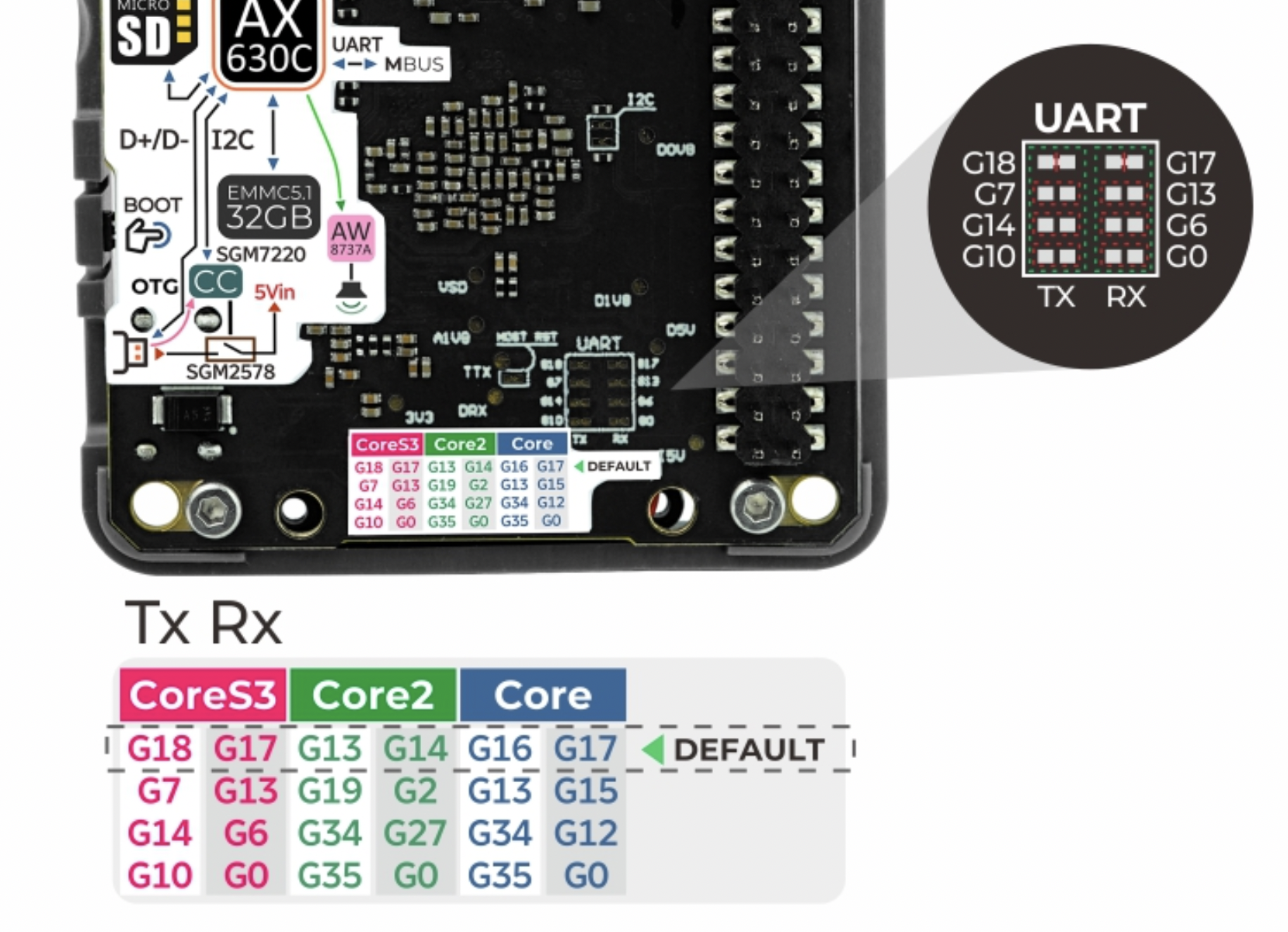
シリアルからならたいした通信はしていないだろうし、基本的には指示をするくらいではないかと思われる。何を送ればいいのかは、Core側のコードを見てみるしかないかな...
オリジナル投稿:
M5stack LLM Module買う -3-|kinneko|pixivFANBOX
https://kinneko.fanbox.cc/posts/9082087
